Daily Rabbit: A Script Font That Adds Personality to Web Design
Recently, I was working on a boutique online store’s homepage redesign. The client wanted something that felt warm, inviting, and slightly whimsical—something that would make the brand feel more human and approachable. After testing several fonts, I came across Daily Rabbit. It wasn’t just another script font; it had a unique charm that immediately stood out.
A Delicate Handwritten Vibe
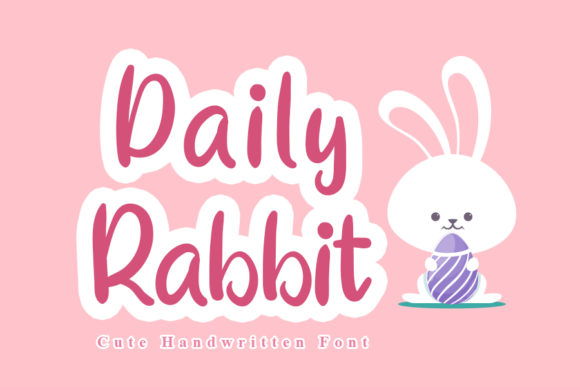
Daily Rabbit is a stylish and delicate handwritten font with a flowing and smooth vibe. It feels like a hand-drawn note written in a cozy café. The curves are soft, and the spacing gives it an elegant, almost nostalgic feel. What caught my eye was how it balanced between being playful and professional. It’s not too childish, but it still carries a touch of personality that can elevate any design.
Testing Daily Rabbit in Real Layouts
I first tested Daily Rabbit in the hero section of the boutique site. I placed it over a light image banner, which worked well because the font’s soft edges didn’t clash with the background. On mobile, it remained legible, which is always a plus. However, I noticed that on darker backgrounds, the contrast wasn’t as strong. So I adjusted the text color slightly to ensure readability without sacrificing the font’s aesthetic.
Next, I used it for a call-to-action button. The rounded shapes and fluid lines made the button feel more approachable than a typical sans-serif option. It added a subtle warmth that aligned with the brand’s identity. But I also considered where to use it sparingly. For example, I reserved Daily Rabbit for headlines and accents rather than body copy, where a cleaner sans-serif would be better for scanning.
Where Daily Rabbit Shines
Daily Rabbit works best in areas where you want to add a bit of flair without overwhelming the user. Here are some ideal use cases:
- Hero Sections: As a headline or tagline, it adds visual interest without distracting from the main message.
- Call-to-Action Buttons: Its friendly appearance encourages clicks and makes the action feel more personal.
- Logo Text: It’s perfect for brands that want to convey creativity and approachability.
- Blog Headers: When paired with a clean body font, it adds character to your content without compromising readability.
- Decorative Accents: Use it for subheadings, quotes, or decorative elements to add a touch of elegance.
- Course Sales Pages: It helps create a welcoming tone that resonates with learners looking for a personal touch.
But it’s important to remember that Daily Rabbit isn’t meant for everything. It’s a display font, so it should be used intentionally. Overusing it can lead to visual clutter and reduce readability, especially on small screens or when used in body text.
Font Pairing Tips
When pairing Daily Rabbit with other fonts, I recommend using a simple sans-serif or serif font for body text. This creates a clear visual hierarchy and ensures the design remains accessible. For example, pairing it with a modern sans-serif like Inter or Montserrat keeps the layout balanced and professional.
If you’re aiming for a more editorial or creative look, consider pairing it with a serif font. This combination can give your design a classic yet contemporary feel. Just be mindful of the contrast and make sure both fonts complement each other rather than compete.
Readability and Responsiveness
One of the biggest challenges with script fonts is ensuring they remain readable on all devices. Daily Rabbit does well on desktops, but I noticed that on smaller screens, the characters could become cramped. To address this, I increased the letter spacing slightly and reduced the font size on mobile. This helped maintain clarity while preserving the font’s character.
Another consideration is contrast. On dark backgrounds, I found that using a lighter text color improved readability significantly. I also tested the font against different image overlays and found that it performed best when the background wasn’t too busy or patterned.
What to Look for Before Using Daily Rabbit
Before incorporating Daily Rabbit into a project, there are a few things to check:
- Webfont Availability: Ensure it’s available as a webfont or through a reliable font service like Google Fonts or Adobe Fonts.
- File Formats: Check if it includes WOFF, WOFF2, TTF, and OTF formats for cross-browser compatibility.
- Weights and Alternates: Look for different weights and alternates (like bold or italic) to give your design more flexibility.
- Commercial Licensing: Make sure you have the proper license for commercial use, especially if you’re building a product or selling digital assets.
- Multilingual Support: Confirm it supports the languages your target audience uses.
These considerations help ensure that Daily Rabbit is not only visually appealing but also functional and legally compliant for your project.
Conclusion
Daily Rabbit is a versatile and charming font that can bring personality and warmth to your designs. Whether you’re building a boutique website, a coaching platform, or a creative portfolio, it has the potential to enhance your brand’s visual identity. Just remember to use it thoughtfully, pair it wisely, and prioritize readability at every step of the design process.